
Coming JUNE 2021
Support policies in Smart-LinQ that have more than four enrollment tiers.
- Import eligibility into Smart-LinQ for policies that have beyond 4 tiers
- Rename and reorder enrollment tiers to support reporting needs
What's Changing
Enrollment Tiers Tab
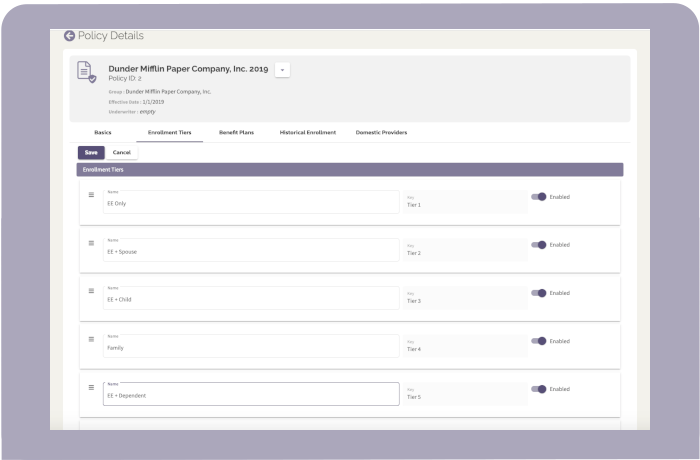
The Policy Details page now has a tab to configure the Enrollment Tiers. Features include:
- A four tier default setup of EE Only, EE + Spouse, EE + Child, and Family will remain
- Add additional tiers as desired
- Use the following functions to support display on the Benefit Plans and Historical Enrollment tabs as well as downstream reporting:
- Enable / Disable; note that eligibility will still map into the system if the toggle is disabled.
- Add or update the name of the tier
- Order the tiers from top to bottom using the drag feature
- All tiers will have a "Key" which is used to understand where eligibility is being mapped.
Benefit Plans Tab
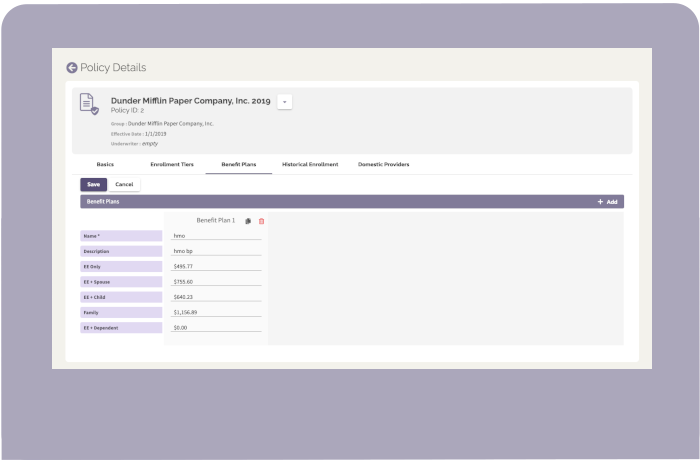
The enrollment tiers on the Benefit Plan form are now dynamic to display what was configured in the Enrollment Tiers tab.
Historical Enrollment Tab
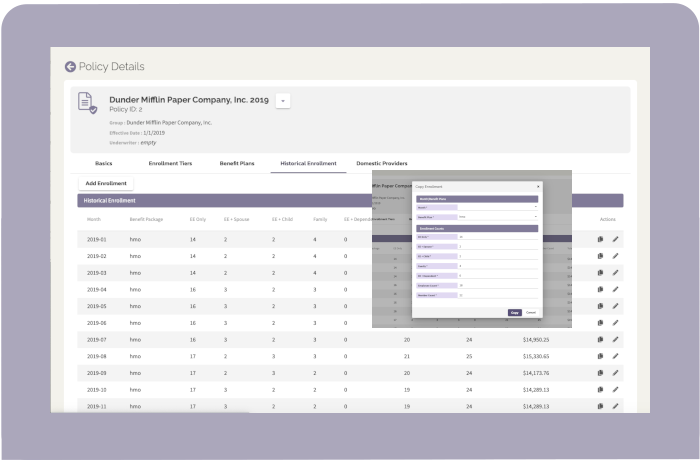
The enrollment tiers on the Historical Enrollment form are now dynamic to display what was configured in the Enrollment Tiers tab.
In addition there is now a copy Historical Enrollment feature to help speed the process of adding incremental records.
Comments
0 comments
Please sign in to leave a comment.