

TPA Process for Finalizing a Final/Firm Quote via Quote-LinQ
There are two steps to ensure that the life cycle of a quote is completed. A completed quote is reflected in the final stage as “Bound” in Quote-LinQ. This guide is intended to provide you with visual guidance on the process in the second of these two steps.
The first step is completed by the underwriter that was awarded the business. The Underwriter should provide signed documents via Quote-LinQ to support the terms of the offer that was firmed. Once that step is completed, the Underwriter will mark the case as Bound via their secure Ringmaster portal. Upon completion of this step in the life cycle of this Quote, an email notification will be sent to the TPA advising of the stage change to “Bound”.
Upon receipt of this information, the TPA will need to follow these steps to complete the process. This is the second and final step in finalizing the contract.
- Once signed into Quote-LinQ, go to the Workspace. Click on the Quick Filters Icon circled below
 , and select “Awarded” or click on the “Awarded” brick on the top of the screen. a. Locate and select the RFP from the RFP Queue that has been Bound by the Underwriter, and then click on the current stage, “Contract Awarded”. See below to find the large arrow that specifies where it is located on the screen.
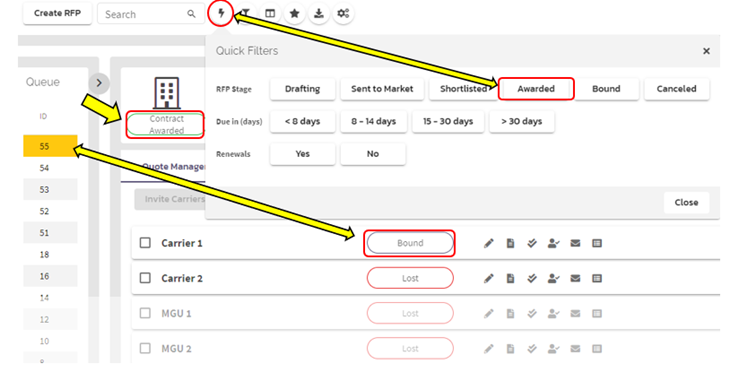
2. The RFP Stages box will pop up. Select “Execute Contract”.
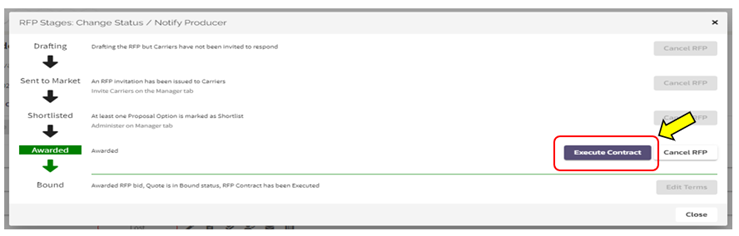
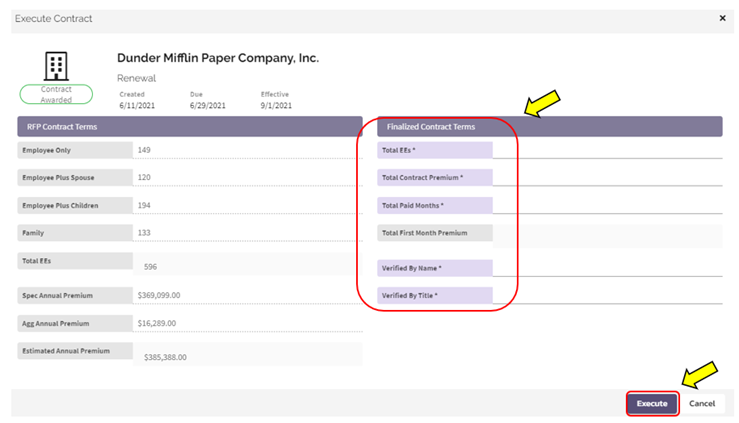
3. After selecting to execute, the “Finalize Contract Terms” screen will appear where the terms for the finalize/firm quote should be entered. The terms that were originally provided on the quote coversheet will be present on the same screen for reference.

a. This is the TPA’s opportunity to audit and validate that the terms and conditions of the contract are accurate. It is also vital that the TPA carefully enter and review the accuracy of this information in this step. While you can edit after executing, if you discover an error or omission, the entry and execution is seen as the completion of the life cycle of this quote.
4. Complete the “Finalized Contract Terms” and select “Execute”.
-
- “Total EEs” is the number of total enrollees listed on the Bound Policy (which may or may not match the original RFP)
- “Total Contract Premium” is the total annual fixed premium costs (both spec and agg premium), including any commission, if applicable.
- “Total Paid Months” is equal to the “paid” terms negotiated for the “spec contract type”
- “Total First Month Premium” is a calculated value based on the the entry in “Total Paid Months” (divided by 12)
- “Verified By Name” and “Verified By Title”, is freeform entry and should reflect the user that completed the “Finalized Contract Terms”
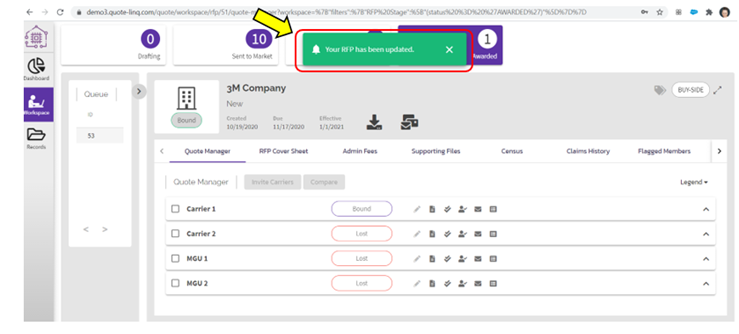
5. A green confirmation pop up will appear to acknowledge that the information has been updated and saved.
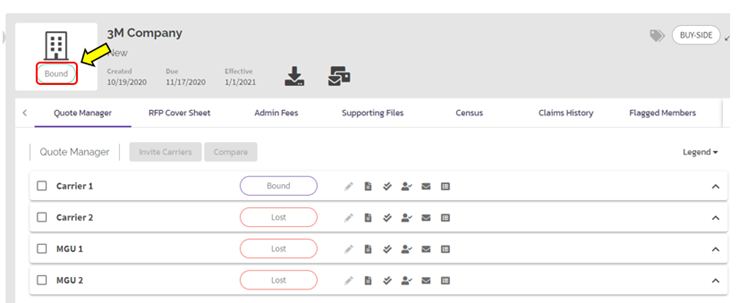
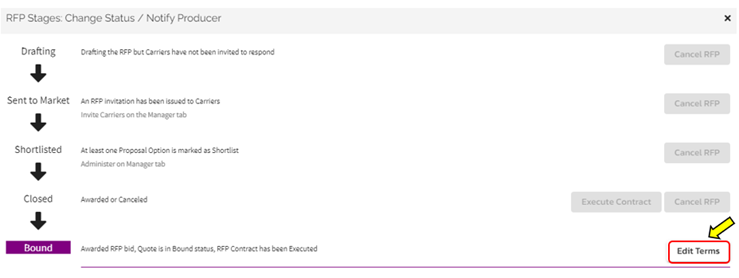
6. If it is discovered that there is a need to update the terms, click on the “Bound” status and then click “Edit Terms”, shown below.
7. This process will finalize the steps for a final/firm quote and is the last step in Quote-LinQ as part of the TPA life cycle of a quote.
Please contact the Ringmaster Account Manager if you have any questions.
Comments
0 comments
Please sign in to leave a comment.